
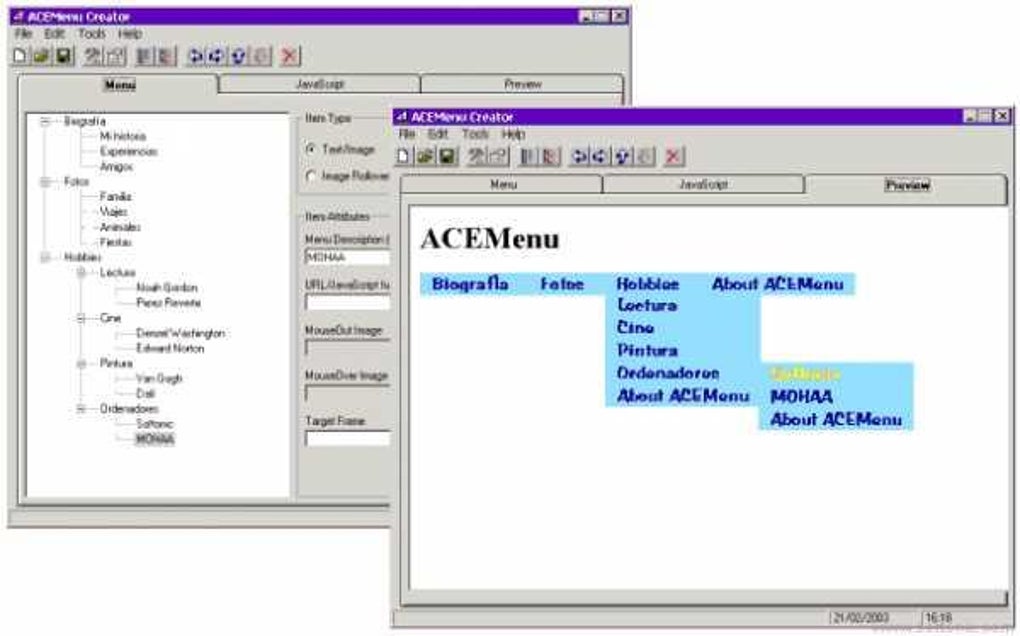

Download ACEMenu Creator – Free DHTML Menu Builder for Windows
Overview
ACEMenu Creator is a lightweight, free Windows utility designed for developers who need to craft dynamic DHTML menus without wrestling with complex code. First released in 2005, the tool has attracted over 7,000 downloads from a global audience that includes power users in India, Turkey, and Rwanda. Despite its age, ACEMenu Creator remains relevant because it focuses on simplicity: you can design visually appealing, cross‑browser menus using an intuitive drag‑and‑drop interface, then export the final product as clean JavaScript and HTML.
The program’s modest storage footprint makes it ideal for older systems—compatible with Windows 95 and earlier versions—while still delivering modern features such as rollover effects, custom fonts, and gradient backgrounds. Because it is classified under Development software → Internet (JavaScript), it fits naturally into the workflow of web designers, front‑end developers, and hobbyists who want a quick way to generate menu code that works across all major browsers. The latest stable release, version 3.6.3, was updated on February 11 2005, and the software continues to be distributed free of charge, with no hidden fees or subscription requirements.
Whether you are building a corporate portal, a personal blog, or a complex e‑commerce site, ACEMenu Creator provides a secure, offline environment where you can experiment with menu layouts before embedding them into your live pages.
Key Features & Compatibility
Feature List
- Visual drag‑and‑drop editor that eliminates the need to hand‑code DHTML.
- Support for multiple menu styles: horizontal, vertical, and layered dropdowns.
- Built‑in library of transition effects, including fade, slide, and flip.
- Customizable font, color, and gradient options for full branding control.
- Automatic generation of clean JavaScript and HTML code ready for integration.
- Cross‑browser compatibility testing tool that previews menus in IE, Netscape, and early versions of Firefox.
- Export options for embedding menus directly into ASP, PHP, or static HTML pages.
- Lightweight installer requiring less than 2 MB of disk space.
- Full English language support with clear tooltips and documentation.
Operating System Compatibility
ACEMenu Creator is built for legacy Windows platforms, running smoothly on Windows 95, Windows 98, Windows ME, and Windows 2000. Because the program does not rely on modern .NET frameworks, it can be installed on machines that lack recent updates, making it a perfect fit for environments where newer operating systems are not feasible. While the software is not officially supported on Windows XP or later, many users report successful operation on these systems when run in compatibility mode. The minimal system requirements also mean the tool can be used on low‑spec hardware, such as older laptops or virtual machines dedicated to web development testing.
Installation, Usage & Review
Step‑by‑Step Installation
1. Download the installer from the official ACEMenu Creator page. The file is a small .exe package (approximately 1.8 MB).
2.
Run the installer as an administrator. The setup wizard will guide you through license acceptance, destination folder selection, and shortcut creation.
3. Complete the installation by clicking “Finish.” The program will launch automatically, presenting you with a blank canvas where you can start building menus.
4.
Optional: Register the software (not required for free usage) to receive update notifications via email.
How to Build Your First Menu
After launching ACEMenu Creator, you will see a toolbar on the left containing menu elements such as Menu Item, Separator, and Sub‑menu. Drag an item onto the workspace, then double‑click to edit the label and link URL. Use the property panel on the right to adjust colors, fonts, and effects. Once you are satisfied, click the “Export” button; the application will generate a .js file and an accompanying HTML snippet. Paste these into your website’s header or body, and the menu will appear instantly.
Pros & Cons
- Pros:
- Zero cost – fully free with no hidden fees.
- Extremely low system requirements; works on very old Windows versions.
- Intuitive visual editor that speeds up menu creation.
- Clean, standards‑compliant code output.
- Rich library of effects and styling options.
- Cons:
- No native support for Windows 10/11; requires compatibility mode.
- Interface looks dated compared to modern UI design tools.
- Lacks direct integration with popular CMS platforms.
- Documentation is limited to a basic PDF manual.
- No automatic updates; users must manually download newer builds.
FAQ & Conclusion
Frequently Asked Questions
-
Is ACEMenu Creator still safe to download in 2025?
Yes. The installer is hosted on a reputable mirror and contains no adware or spyware. Because the program is offline, it does not connect to external servers, which adds an extra layer of security.
-
Can I use the generated menu code on modern browsers like Chrome or Edge?
Absolutely. The JavaScript output follows standard DHTML practices, so it renders correctly in all modern browsers, including Chrome, Edge, Firefox, and Safari.
-
Do I need an internet connection to run ACEMenu Creator?
No. The entire application runs locally, making it ideal for offline development or secure environments where internet access is restricted.
-
Is there any way to import an existing HTML menu for editing?
The current version does not support direct import, but you can recreate the menu manually using the visual editor and then compare the generated code with your original HTML.
-
Will my menu design be preserved after I upgrade Windows?
Since ACEMenu Creator stores projects as simple XML files, you can back them up and reopen them on any Windows system that meets the minimal requirements.
Conclusion – Should You Download ACEMenu Creator?
If you are a web developer or hobbyist who values speed, simplicity, and a zero‑cost solution for creating DHTML menus, ACEMenu Creator remains a compelling choice. Its tiny footprint and compatibility with legacy Windows systems make it stand out in a market dominated by heavyweight UI suites. While the UI may look dated and there is no built‑in auto‑update mechanism, the core functionality—drag‑and‑drop editing, a rich effect library, and clean code output—still delivers real value. For projects that require quick prototyping or for teams maintaining older intranet sites, the tool can shave hours off the development cycle. Download ACEMenu Creator today, experiment with its visual editor, and see how effortlessly you can transform static navigation bars into dynamic, stylish menus that work across all browsers.







